Project Overview
This is an AI-based app for reading and extracting order shipment information. It analyzes, labels, and feeds the data into existing processing systems. ZOBA supports thousands of order formats, significantly reducing manual data entry.
By automating the tedious process of transcribing invoices, delivery notes, and other logistical documents, the platform not only accelerates data processing but also dramatically improves accuracy. It acts as an intelligent layer between physical or digital documents and the company's core ERP or management software.
The system is designed for scalability, allowing it to handle fluctuating volumes of documents, and it maintains a full audit trail for compliance and verification purposes. This ensures that as the business grows, the data-import process remains efficient and transparent.
Web Application Showcase
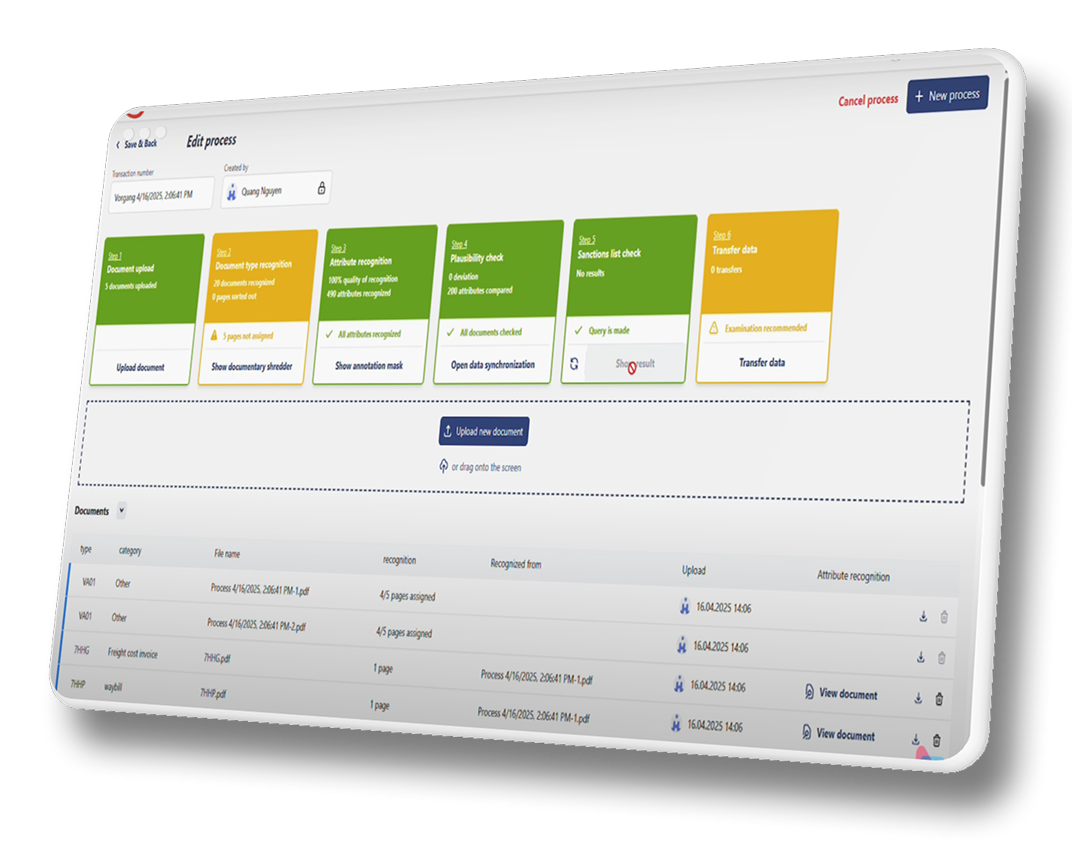
Key Features
- File Conversion: Automatically converts uploaded files (PDF, JPG, PNG) into a standardized image format for processing.
- AI Document Classification: Intelligently utilizes AI to identify and classify different document types (e.g., invoice, delivery note).
- Automated Data Extraction: Applies AI to extract and label key information, such as invoice numbers, dates, and line items.
- Sanction Check: Performs an automated sanction check on extracted data (like names or addresses) against compliance lists.
- Human-in-the-Loop UI: Provides a user-friendly interface for operators to quickly verify, correct, and approve AI-extracted data.
- System Integration: Securely transfers the processed and verified information to designated service providers or internal ERP systems.
- Analytics & Reporting: Dashboards to track processing times, accuracy rates, and operator performance.
Solutions
- Apply image pre-processing techniques such as: Sharpening and contrast enhancement , automatic deskewing (straightening the image), use libraries like OpenCV or PIL to standardize images before feeding them into the OCR process.
- Develop a template classification model to identify the document type before extraction. Allow customizable training for enterprise-specific document templates.
- Utilize specialized models for table extraction, such as Amazon Textract AnalyzeDocument.
- Implement a human-in-the-loop confirmation interface that displays AI results and allows quick manual corrections.
- Use confidence scores to highlight fields that require user verification.
- Log corrected data to retrain and improve the model over time.